In this article
8 Ways to Keep AI-Generated Characters Consistent Across Scenes
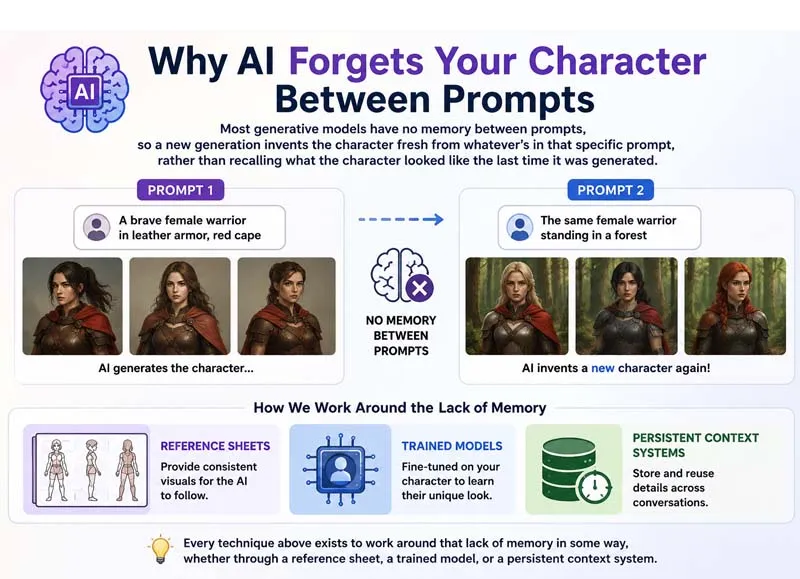
Generative AI models don't remember characters between prompts. Ask a model for "Tom the space pirate" and it invents Tom fresh, based purely on the words in that prompt. Ask for "Tom eating lunch" a minute later, and the model has no memory of what the first Tom looked like, so it invents him again, usually slightly differently. That's the entire root cause of character drift, and it's why so much AI video still looks like a rotating cast of similar-looking strangers rather than one consistent performer.
The stakes for fixing this keep rising. AI-generated video is projected to account for roughly 10% of all digital video content in 2026, and 78% of marketing teams already use it in production, according to a 2026 analysis from Kapwing. At that scale, a brand mascot, an AI influencer, or a narrative series that can't hold its own main character isn't a minor bug, it's the difference between a publishable series and a backlog of near-misses. Below are eight techniques, grounded in how these systems actually work, for keeping a character recognizably themselves from the first scene to the last.
How invideo agent puts these techniques into practice
Most of the eight methods below are easiest to see in action inside one system, so it's worth laying out how invideo agent approaches character consistency as a whole before breaking down the individual techniques.
At the center is a persistent context engine: once a character's reference sheet is locked into a project, that identity, along with any products, locations, and style choices tied to it, carries forward automatically across every subsequent shot, scene, and session, rather than needing to be re-established each time a new shot is requested. That reference sheet itself is built at 4K across four angles, front, three-quarter, profile, and back, plus a face close-up, so the model isn't left guessing at how a character should look from an angle it's never seen.
Because invideo agent routes each shot to whichever of its 200+ underlying models, including Veo 3.1, Sora 2, Kling 3.0, Seedance 2.0, Recraft, and GPT Image 2.0, best fits that particular shot, the same locked character reference has to travel with the shot regardless of which model actually renders it, which is exactly what the persistent context engine is built to do. On top of that, a Camera Controls feature lets a director choose a specific move, a dolly-in, a crash zoom, a 360-degree orbit, as a deliberate pre-production decision, and hold that same choice consistently across a sequence rather than re-approximating it with every new generation.
For harder cases, like two characters physically interacting in a shot, a director can sketch the physical arrangement by hand, and the agent turns that sketch into a single fused reference sheet for that exact configuration, which then gets locked and reused the same way a single-character sheet would be. Material and wardrobe behavior, how lattice-knit yarn moves versus how sequins catch light, gets described in words alongside the visual reference, since a still image alone doesn't teach a model how a garment should behave once the character is moving.
Best for: directors, filmmakers, and studios who want a character's identity to hold not just within one clip, but across an entire multi-scene or multi-episode production, without re-establishing it each time.
Pricing: plans start at $17/month, with team and enterprise options also available.
The eight techniques below unpack the general principles behind that system, whichever specific tool you end up using to apply them.
1. Start with a locked, multi-angle reference sheet, not a single portrait
A single front-facing photo is the weakest possible anchor for a character, because it gives a model no information about how that face or body should look from any other angle. The stronger approach is to build a reference sheet before generating anything: front, three-quarter, profile, and back views, plus a face close-up, ideally at high resolution so fine detail like bone structure and hairline survive being referenced dozens of times.
This is the exact approach invideo agent's character workflow is built around, capturing a character at 4K across all four angles plus a face close-up before that character ever appears in a generated shot, precisely because a model asked to infer a profile view from only a front-facing photo will guess, and guesses are where drift starts.
2. Lock identity before you animate, don't ask one prompt to do both
A common mistake is asking a single prompt to simultaneously invent a character's appearance and animate them doing something, expecting the model to hold both jobs steady at once. It's more reliable to treat those as two separate steps: fully resolve who the character is first, using a reference image or reference sheet, and only then generate motion on top of that already-locked identity. Treating identity and animation as sequential steps, rather than one combined request, is the single change most creators report making the biggest difference in a project's overall consistency.
3. Use a system with memory across scenes and sessions, not just within one clip
Most consistency features only solve half the problem: they'll keep a character stable within a single generated clip, but the moment a new session starts, or a new scene is requested, the model has no memory of the character it just held together a moment ago. A genuinely useful system needs to carry that identity forward automatically.
This is the specific gap a persistent context engine closes. In invideo agent, once a character's reference sheet is locked into a project, every later prompt referencing that character automatically carries the sheet with it, across scenes, sessions, and even multiple episodes of a series, regardless of which underlying video model actually renders that particular shot. The reference doesn't need to be re-uploaded or re-described each time a new shot comes up.
4. Describe material and wardrobe behavior in words, not just pictures
A reference image shows what an outfit looks like standing still, but it says nothing about how the fabric should behave once the character starts moving, and that gap is where a lot of visible inconsistency creeps in during motion, not just between static frames. Lattice-knit yarn should move soft and loose; sequins should catch light and stay rigid; leather should hold its shape. If that behavior isn't specified, the model tends to default to generic cloth physics that don't match the reference photo at all once the character is in motion.
invideo agent's workflow asks for exactly this kind of material description alongside the reference images, precisely because a locked visual reference alone doesn't teach a model how a garment is supposed to move.
5. Train a dedicated model on the character for high-volume, recurring work
For a character that's going to appear across dozens or hundreds of future generations, an image-matching approach applied fresh at generation time isn't always the most efficient option. Training a small custom model on that character's reference images bakes the identity in more durably, so it holds up across a much larger volume of output without needing the reference re-applied every time.
OpenArt AI's custom LoRA training feature works this way: a creator uploads reference images once, trains a personalized model from them, and can then generate that character across unlimited future stills and short videos. It's a heavier upfront step than a simple reference upload, but it pays off specifically at scale, which is why agencies managing recurring characters across many client projects tend to reach for it.
6. Reuse a named character asset instead of re-uploading it every time
Re-uploading the same reference images into every new prompt is not just tedious, it's also a place where small selection errors creep in, the wrong crop, a slightly different angle, an outdated version of the reference. Naming and saving a character as a reusable asset removes that manual step entirely.
Leonardo AI's Character Reference tool locks a protagonist's face shape, proportions, and features across every still image in a project once it's set, rather than requiring a fresh upload per generation. LTX Studio takes a similar approach with its Elements system, letting a creator tag a saved character into any future shot with a simple mention rather than re-attaching files.
7. Handle two-character interaction with one fused reference, not two separate locks
Locking two characters independently works fine until they need to occupy the same frame and physically interact, at which point their identities can blur exactly at the point of contact, a handshake, an embrace, a shared prop, because the model is now trying to reconcile two separate reference sheets in the same small region of the image at once. This remains one of the genuinely unsolved edge cases in character consistency, even on tools that handle single-character stability well.
invideo agent's approach to this specific problem is to skip describing the interaction in text altogether. A director can sketch the physical arrangement of the two characters by hand, and the agent turns that sketch into a single fused reference sheet for that exact configuration, which then gets locked and reused the same way a single-character sheet would be, rather than asking the model to blend two independent references on the fly.
8. Treat consistency as an ongoing QA pass, not a one-shot guarantee
Even with a locked reference sheet, a trained model, and a persistent memory system doing their job, character consistency isn't something to set once and forget. Two specific failure modes tend to show up later in a project rather than on the first generation: strong emotional expressions, full laughter, grief, or anger, can produce a frame where the character momentarily looks like someone else, particularly in close-ups, and long sequences can drift gradually enough that a character five scenes in doesn't quite match the character from scene one, even though no single generation looks obviously wrong.
The practical fix is to review for both of these specifically, rather than only checking that a character looks right in isolation, and to regenerate the outlier frames rather than accepting a first pass that's close enough. Within-clip stability is largely a solved problem across serious tools in 2026; expression range and long-form continuity are where the remaining work still happens.
Frequently asked questions
What's the single biggest reason AI-generated characters look different between scenes?
Most generative models have no memory between prompts, so a new generation invents the character fresh from whatever's in that specific prompt, rather than recalling what the character looked like the last time it was generated. Every technique above exists to work around that lack of memory in some way, whether through a reference sheet, a trained model, or a persistent context system.
Do I need a different reference approach for illustrated or anime-style characters versus photoreal ones?
Often, yes. Illustrated and anime characters typically hold up well with multiple reference images saved as a named profile, since style consistency matters as much as facial geometry. Photoreal human characters tend to need the fuller multi-angle, high-resolution reference sheet approach, since small errors in bone structure or proportion are more immediately visible to a viewer than they are on a stylized character.
Is it possible to keep two characters consistent when they're never in the same shot together?
Yes, and it's meaningfully easier than the interacting-characters case. Two independently locked reference sheets, each carried forward by a persistent context system, hold up fine as long as the characters don't need to occupy the same frame and physically interact. The harder problem specifically involves contact points between characters in a shared shot.
How much of this can be automated versus done manually?
Most of the reference-building and material-description steps happen once, upfront, per character, and then get reused automatically by a system with persistent memory. The one step that still benefits from manual attention throughout a project is the final quality-assurance pass, since expression range and long-form drift are the two failure modes most likely to slip through even a well-built reference and memory system.

Get posts in your inbox
One email a week — new guides, comparisons and the AI tool news actually worth reading.
✓ You're subscribed — check your inbox to confirm.