In this article
Most people use AI one prompt at a time: ask a question, copy the answer, move on. That works for quick tasks, but it does not scale. An AI workflow connects several steps into a repeatable process, so the same job gets done the same way every time, with less effort from you. In this beginner-friendly guide you will learn what an AI workflow is, how to design one, and how to build your first one step by step.
What Is an AI Workflow?
An AI workflow is a series of connected steps where AI handles part of the work, from the moment something triggers the process to the final result. A workflow might take a customer email, sort it by topic, draft a reply, and send it to a person for approval, all without you starting each step manually.
Think of it like a small assembly line. Each station does one job, and the product moves along until it is finished.
AI Workflow vs. Single Prompt vs. AI Agent
| Approach | How it works | Best for |
|---|---|---|
| Single prompt | You ask, AI answers once | Quick, one-off tasks |
| AI workflow | Fixed steps run in a set order | Repeatable, predictable processes |
| AI agent | AI decides its own steps to reach a goal | Flexible, open-ended tasks |
For beginners, workflows are the best place to start. They are easier to control, easier to test, and easier to fix when something goes wrong.
The Main Parts of an AI Workflow
- Trigger: The event that starts the workflow, such as a new email, a form submission, or a scheduled time.
- Input: The information the workflow works with, like text, files, or data.
- AI step: The task AI performs, such as summarising, classifying, writing, or extracting details.
- Rules and checks: Conditions that decide what happens next, such as "if the email is a complaint, flag it."
- Action: What the workflow does with the result, like saving a file, updating a sheet, or sending a message.
- Human review: A point where a person approves important results before they go out.
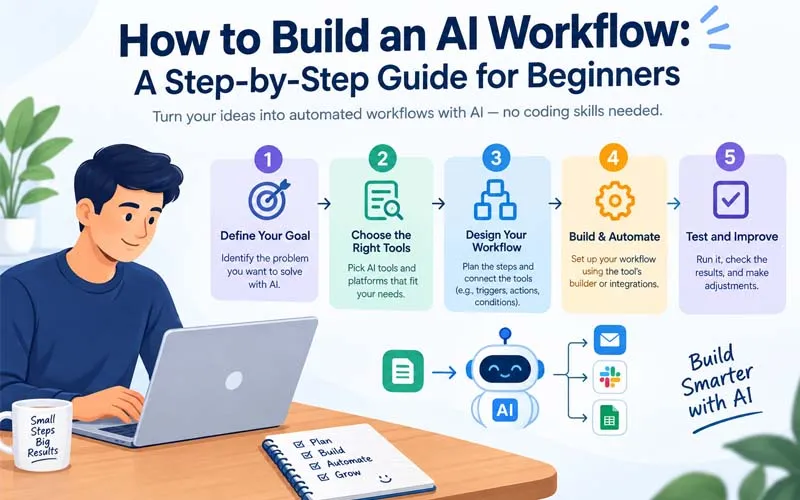
Step-by-Step: How to Build Your First AI Workflow
Step 1: Choose One Repetitive Task
Pick a task you do often, that follows a similar pattern each time, and that is low risk if it goes slightly wrong. Good starter examples include:
- Summarising meeting notes and listing action items
- Sorting incoming emails or support requests
- Turning a blog outline into a social media post set
- Extracting details from invoices or forms into a spreadsheet
Step 2: Write Down the Manual Process
Before adding any AI, list exactly how you do the task by hand. Write each step in order, like a recipe. This map shows you which steps AI can do and which need a human.
- What starts the task?
- What information do I need?
- What decisions do I make along the way?
- What is the final result, and where does it go?
Step 3: Decide Which Steps AI Should Handle
AI is strong at drafting, summarising, sorting, translating, and pulling out key details. It is weaker at tasks needing perfect accuracy, deep context, or sensitive judgement. Give AI the routine parts and keep people in charge of decisions with real consequences.
Step 4: Pick Your Tools
You usually need two types of tools:
- An AI assistant to do the thinking and writing part.
- An automation platform to connect your apps and run the steps, such as Zapier, Make, or n8n. Many no-code options let you build visually without programming.
Choose tools that connect with the apps you already use, such as your email, spreadsheets, or project software.
Step 5: Write Clear Instructions for the AI Step
The quality of your workflow depends heavily on the instructions you give the AI. A strong instruction includes:
- Role and goal: What the AI is doing and why.
- Input description: What kind of information it will receive.
- Rules: Tone, length, things to avoid, and what to do when information is missing.
- Output format: A clear structure, such as a short summary followed by a bullet list of action items.
Be specific. "Summarise this meeting in five bullet points and list each action item with an owner" works far better than "summarise this."
Step 6: Build the Workflow One Step at a Time
Connect your trigger, then add one step at a time and test each before moving on. A simple example for sorting customer emails might look like this:
- Trigger: A new email arrives in your support inbox.
- AI step: Classify the email as billing, technical issue, or general question.
- Rule: If it is a billing question, send to the accounts folder. Otherwise, send to support.
- AI step: Draft a suggested reply.
- Human review: A team member checks and sends the reply.
Step 7: Add a Human Check
Never let a new workflow send messages, spend money, or delete data with no oversight. Add an approval step, especially at the start. You can reduce review gradually once you trust the results.
Step 8: Test With Real Examples
Run the workflow on at least five to ten real examples, including a few unusual ones. Check for wrong answers, missing information, awkward wording, and cases where the workflow behaves unexpectedly. Note every problem and refine your instructions.
Step 9: Launch Small and Monitor
Start with a limited version, such as one team, one inbox, or a few days a week. Keep an eye on results, review a sample regularly, and collect feedback from anyone affected.
Step 10: Improve Over Time
Good workflows are never finished. As you see where the AI struggles, adjust the instructions, add rules, or move a step back to a human. Small improvements add up quickly.
Beginner-Friendly AI Workflow Ideas
- Content repurposing: Turn one blog post into a newsletter intro, social posts, and a short summary.
- Meeting follow-ups: Transcribe a meeting, write a summary, and send action items to attendees.
- Lead handling: Capture a form submission, research the company briefly, and draft a personalised reply.
- Research digest: Collect articles on a topic each week and produce a short summary with links.
- Invoice processing: Extract key details from invoices and add them to a spreadsheet for review.
Common Mistakes Beginners Make
- Starting too big: Automating an entire department at once leads to confusion. Begin with one small task.
- Vague instructions: Unclear prompts produce inconsistent results.
- No human review: Unchecked automation can spread mistakes quickly.
- Skipping testing: A workflow that works on one example may fail on others.
- Sharing sensitive data carelessly: Check the privacy practices of every tool before connecting private information.
- Automating a broken process: If the manual process is messy, fix it first.
How to Measure Whether Your Workflow Is Working
- Time saved per task or per week
- Error rate found during reviews
- Edits needed before output is usable
- Team or customer feedback
- Cost compared with the value of time saved
Final Thoughts
Building an AI workflow is less about advanced technology and more about clear thinking. Pick a small repetitive task, map the manual steps, let AI handle the routine parts, keep a human in the loop, and test before you trust it. Start with one workflow, learn from it, and expand step by step. Soon, the repetitive parts of your work will run quietly in the background while you focus on what matters most.
Frequently asked questions
Do I need to know how to code to build an AI workflow?
No. Many automation platforms offer visual, no-code builders. Coding helps for advanced or custom workflows but is not required to start
How long does it take to build a simple AI workflow?
A simple workflow can be built in an hour or two. Testing and refining it usually takes a bit longer, so plan for a few days of improvement.
Are AI workflows safe for business use?
They can be, if you choose tools with clear privacy policies, limit what data is shared, and keep human approval on important steps.
What is the difference between an AI workflow and an AI agent?
A workflow follows fixed steps you design. An agent decides its own steps to reach a goal. Workflows are more predictable, which makes them better for beginners.
Get posts in your inbox
One email a week — new guides, comparisons and the AI tool news actually worth reading.
✓ You're subscribed — check your inbox to confirm.