In this article
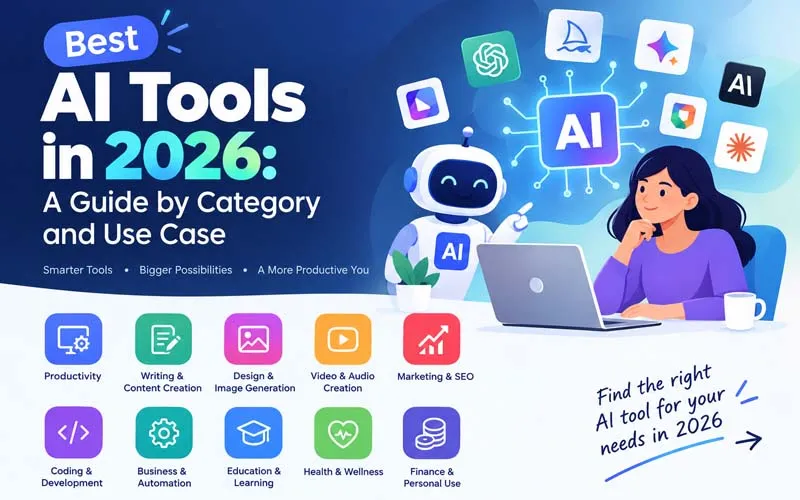
The number of AI tools has exploded, and picking the right one can feel like searching for a needle in a haystack. The good news is that you do not need dozens of subscriptions. You need one or two reliable tools for each job you actually do. This guide groups the best AI tools in 2026 by category and by use case, so you can quickly find what fits your work, your budget, and your skill level.
How to Choose the Right AI Tool
Before you look at any list, ask yourself four simple questions:
- What exact task do I want to save time on? Writing, design, research, coding, and meetings all need different tools.
- How sensitive is my data? Check the privacy policy before uploading client files or confidential documents.
- Does it fit my existing workflow? A tool that connects with your email, docs, or design software saves more time than a standalone app.
- Is there a free plan or trial? Test with a real task before you pay.
Note: features and pricing change quickly in this space, so always check each tool's official website for the latest details.
Best AI Tools by Category
1. AI Chat and Writing Assistants
These are the all-rounders. They can draft emails, summarise long documents, brainstorm ideas, explain difficult topics, and help you edit your writing.
- ChatGPT: A popular general-purpose assistant with a wide range of features and integrations.
- Claude: Known for thoughtful long-form writing, careful reasoning, and handling large documents.
- Google Gemini: A strong choice if you already live in Gmail, Docs, and other Google apps.
- Microsoft Copilot: Convenient for people who work mostly in Word, Excel, and Outlook.
Best for: everyday writing, summaries, brainstorming, and quick answers.
2. AI Research Tools
Research tools focus on finding and organising information, often with sources you can check.
- Perplexity: An AI-powered answer engine that shows where its information comes from.
- NotebookLM: Lets you upload your own documents and ask questions about them, which is handy for studying and report writing.
- Elicit and Consensus: Help you explore academic papers and scientific findings.
Best for: students, analysts, journalists, and anyone who needs sourced answers.
3. AI Image Generation and Design Tools
Create visuals from a text description or speed up your design workflow.
- Midjourney: Popular for artistic, high-quality image creation.
- Adobe Firefly: Built into Adobe's creative apps, with a focus on commercially safe use.
- Canva (Magic tools): Easy for non-designers to build social posts, presentations, and banners.
- Figma AI features: Useful for interface designers who want faster layouts and ideas.
Best for: social media graphics, blog images, mockups, and marketing visuals.
4. AI Video and Audio Tools
Video and voice tools can turn a script into a finished clip or clean up a recording in minutes.
- Runway: Generates and edits video clips with AI.
- Synthesia and HeyGen: Create presenter-style videos with AI avatars, popular for training and product explainers.
- ElevenLabs: Produces natural-sounding voiceovers in many languages.
- Descript: Edit audio and video by editing the transcript, as easily as editing a document.
Best for: YouTubers, course creators, podcasters, and marketing teams.
5. AI Coding Tools
Coding assistants suggest code, explain errors, write tests, and in some cases complete multi-step tasks across a project.
- GitHub Copilot: Works inside popular code editors with inline suggestions and chat.
- Cursor: An AI-first code editor built around chatting with your codebase.
- Claude Code: A command-line coding assistant that can read a project and make changes on request.
Best for: developers who want faster prototyping, debugging, and refactoring. Always review generated code before shipping it.
6. AI Productivity and Meeting Tools
- Notion AI: Summarise notes, draft pages, and search across your workspace.
- Otter.ai and Fireflies: Record, transcribe, and summarise meetings with action items.
- Grammarly: Improves grammar, tone, and clarity as you write.
Best for: busy professionals, remote teams, and anyone drowning in meetings.
7. AI Marketing and SEO Tools
- Jasper: Built for marketing copy and brand voice consistency.
- Surfer SEO and similar tools: Guide you on keywords and content structure for search rankings.
- Copy.ai: Helps with ad copy, product descriptions, and sales emails.
Best for: content marketers, small business owners, and agencies.
8. AI Automation Tools
- Zapier: Connects thousands of apps and now includes AI-powered automations.
- Make: A visual builder for more detailed workflows.
- n8n: A flexible option popular with technical users who want more control.
Best for: cutting out repetitive tasks such as lead capture, reporting, and data entry.
Quick Comparison Table
| Category | Example Tools | Best For |
|---|---|---|
| Chat and writing | ChatGPT, Claude, Gemini | Drafting and brainstorming |
| Research | Perplexity, NotebookLM | Sourced answers and study |
| Image and design | Midjourney, Firefly, Canva | Visual content |
| Video and audio | Runway, ElevenLabs, Descript | Content creation |
| Coding | GitHub Copilot, Cursor, Claude Code | Faster development |
| Productivity | Notion AI, Otter.ai | Notes and meetings |
| Marketing and SEO | Jasper, Surfer SEO | Copy and rankings |
| Automation | Zapier, Make, n8n | Workflow automation |
Best AI Tools by Use Case
For Students
Combine a chat assistant for explanations with NotebookLM for studying your own notes, and Grammarly for polishing essays. Use them to understand concepts, not to replace your own thinking.
For Freelancers and Solopreneurs
A writing assistant, Canva for quick designs, and an automation tool like Zapier can replace hours of weekly admin. Add a meeting transcriber if you work with many clients.
For Small Businesses
Focus on customer-facing wins first: marketing copy, social graphics, and automated follow-ups. Then add a research tool for competitor and market insights.
For Developers
Pair an AI code editor or assistant with a chat tool for architecture questions and documentation. Keep tests and code review in your process.
For Content Creators and Marketers
Use a writing assistant for outlines, an SEO tool for keyword guidance, an image generator for visuals, and a video tool to repurpose one idea across formats.
Common Mistakes When Using AI Tools
- Trusting everything blindly: AI can state wrong facts confidently, so verify important claims.
- Using too many tools: Mastering two or three beats juggling twenty.
- Sharing sensitive data: Avoid pasting confidential information into tools you have not vetted.
- Publishing raw output: Edit and add your own experience so the content sounds like you and stays original.
Final Thoughts
The best AI tool is the one that solves a real problem in your day. Start by naming the task, pick one tool from the matching category, test it on real work, and only then expand your toolkit. With a focused approach, AI becomes a practical helper rather than another distraction.
Frequently asked questions
What is the best AI tool overall in 2026?
There is no single winner. A general chat assistant is the best starting point for most people, and you can add specialised tools as your needs grow.
Are there good free AI tools?
Yes. Many popular tools offer free tiers or trials, which are usually enough to test whether the tool suits your workflow.
Can AI tools replace human workers?
They are best at speeding up repetitive tasks and first drafts. Human judgement, creativity, and accountability are still essential.
How do I keep my data safe when using AI tools?
Read the privacy policy, avoid sharing confidential details, and choose business plans that offer stronger data controls when working with client information
Get posts in your inbox
One email a week — new guides, comparisons and the AI tool news actually worth reading.
✓ You're subscribed — check your inbox to confirm.